
Slidarr Musical Instrument
Published:
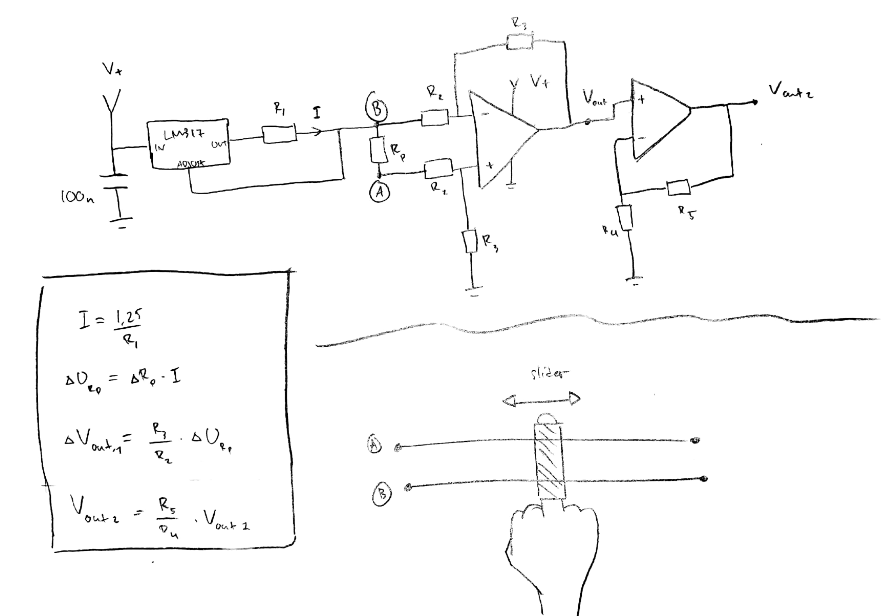
The initial idea was for an instrument resembling a guitar where touching two strings with a conductive finger would create a connection. The finger’s location would then determine a tone, essentially mapping piano keys to guitar strings.
The project’s goal is to create a prototype (a proof of concept) to demonstrate this idea and inspire future development.
- Prototype Simplification: To realize the prototype, the environment is simplified to use only a single string/wire and a copper finger (connected to a wire) to measure the resistance/distance where they touch.
- Focus: The primary focus for this proof of concept is on the electronic hardware and software needed for the system to function, allowing the final instrument type to be flexible.
Outcome:
- Collaborated with a team to design a musical instrument prototype using a copper wire and metal finger interface to generate MIDI signals, controlled via a microcontroller (TM4C/Arduino).
- Integrated the MIDI protocol and programmed the microcontroller in embedded C to process touch input, generating corresponding musical tones in real-time and ensuring seamless communication with the synthesizer.
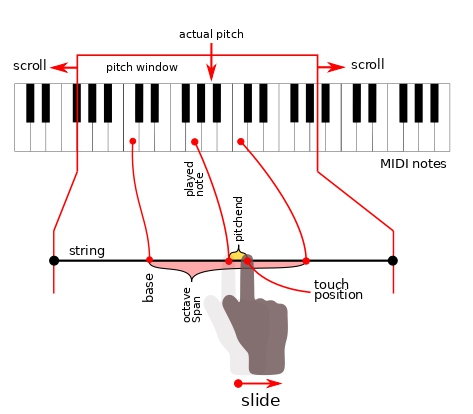
The Slidarr string acts as a segment of a traditional piano keyboard.
Note Activation: Touching and releasing the Slidarr on the string corresponds to pressing and releasing a piano key. An embedded system determines the location (via resistance measurement) and sends the data to a synthesizer to generate the tone.
Sliding (Pitchbend): The name “Slidarr” comes from the ability to slide the finger while touching the string. This action:
- Bends the pitch of the current tone.
- Sends pitchbend messages to the synthesizer.
- Once the maximum pitchbend is reached, the software seamlessly switches to the next tone.
Calibration and Mapping:
- The instrument must be calibrated first to determine the minimum and maximum resistance range of the wire.
- The calibrated range is then mapped to one octave on the keyboard.
- The starting position is typically the middle of the keyboard, C4 (261 Hz).
Scrolling (Octave Shift): To change the current frequency range (octave) to a different location on the total note scale:
- The user must hold down the scroll button while touching the Slidarr.
- Sliding in the desired direction then causes the entire frequency window to slide (scroll) to the left or right of the total scale.